Tampilkan postingan dengan label Recovery. Tampilkan semua postingan
Pertama Buka software HDD Regenerator
1. Sediakan flashdisk 4 GB
2. Lalu klik Bootable USB flash atau Bootable CD/DVD

3. Disini saya memilih flashdisk untuk membuat boot, lalu klik ok untuk membuat boot
 4. Akan muncul tampilan seperti gambar dibawah ini, lalu pilih ok untuk menghapus dan membuat boot pada flashdisk
 5. Lalu pilih yes untuk menrestart komputer dan untuk menjalankan boot pada flashdisk
 6. Setting dulu bootingnya menjadi flashdisk lalu save
 7. Pilih angka 1 atau 2 untuk menscan hardisk(2) atau flashdisk(1)
 8. Pilih 1,2,atau 3
1. untuk scan dan memperbaiki
2. untuk scan dan tidak memperbaiki
3. baca sendiri ok :D
 9. proses memperbaiki bad sector
 SELESAI Tunggu sampai dengan proses selesai dan proses ini akan memakan waktu cukup lama tergantung dari tingkat BAD yang ada di magnetikdisknya dan besarnya kapasitas hardisk.
Terima kasih Semoga membantu :D
1. Sediakan flashdisk 4 GB
2. Lalu klik Bootable USB flash atau Bootable CD/DVD

3. Disini saya memilih flashdisk untuk membuat boot, lalu klik ok untuk membuat boot


1. untuk scan dan memperbaiki
2. untuk scan dan tidak memperbaiki
3. baca sendiri ok :D


Terima kasih Semoga membantu :D
Rating: 4.5
Reviewer: Unknown
ItemReviewed: [TUTORIAL] Cara Memperbaiki Bad Sector Hardisk Menggunakan HDD Regenerator
Pernah menghapus file-file penting di komputer tanpa disengaja? Kasus seperti ini mungkin pernah menimpa Anda, terkadang terjadi karena kita tengah terburu-buru atau dikejar waktu.
Namun jangan khawatir, Anda bisa menggunakan tools khusus untuk mengembalikan file-file tadi. Berikut ini ada 4 tools yang bisa Anda gunakan untuk mengembalikan file yang terhapus. Tools ini dapat di-download secara gratis di internet.
1. Undelete Plus
Di antara aplikasi-aplikasi gratis yang beredar di luaran untuk mengembalikan file yang terhapus, Undelete Plus salah satu yang dapat digunakan. User interface-nya (antar muka) tergolong sangat simpel. Anda dapat mengembalikan file-file yang terhapus dengan mudah sesuai dengan tipe file, misalnya Application, GIF graphics, HTML Documents, PDF.
Tools ini beroperasi pada sistem operasi Windows 95, Windows 98, Windows Me, Windows NT, Windows 2000, Windows XP, Windows 2003 dan Windows Vista. Anda dapat men-download Undelete Plus di: http://www.undelete-plus.com/
2. Restoration
Restoration adalah salah satu aplikasi untuk mengembalikan file yang terhapus. Tools ini juga sangat mudah digunakan dan tidak perlu diinstal di komputer. Cukup download toolsnya di: http://www.snapfiles.com/get/restoration.html, lalu jalankan file executable-nya untuk mengembalikan file yang terhapus.
3. PC Inspector File Recovery
Meski user interface PC inspector File Recovery tidak begitu user friendly, aplikasi ini tergolong sangat ampuh untuk mendeteksi dan mengembalikan file yang terhapus. Sesudah dilakukan proses scanning, akan tersaji file-file yang terhapus dalam folder dengan struktur pohon (tree structure) untuk mempermudah pencarian. Dengan begitu, Anda dengan mudah dapat mencari dan memilih file/folder yang terhapus, lalu klik icon “save” untuk mengembalikan file. Tools ini dapat di-download di: http://www.pcinspector.de/Sites/file_recovery/info.htm?language=1
4. Recuva
Recuva sering disebut juga sebagai “Recover”. User interface-nya sangat sederhana. Pada mode basic, tools ini akan menampilkan daftar file-file yang terhapus yang bisa dikembalikan. Jika Anda menggantinya ke mode advanced, maka proses scanning ulang akan dilakukan dan muncul pilihan untuk menampilkan informasi berisi daftar file-file yang terhapus. Tools ini dapat di-download di: http://www.recuva.com/
Namun jangan khawatir, Anda bisa menggunakan tools khusus untuk mengembalikan file-file tadi. Berikut ini ada 4 tools yang bisa Anda gunakan untuk mengembalikan file yang terhapus. Tools ini dapat di-download secara gratis di internet.
1. Undelete Plus
Di antara aplikasi-aplikasi gratis yang beredar di luaran untuk mengembalikan file yang terhapus, Undelete Plus salah satu yang dapat digunakan. User interface-nya (antar muka) tergolong sangat simpel. Anda dapat mengembalikan file-file yang terhapus dengan mudah sesuai dengan tipe file, misalnya Application, GIF graphics, HTML Documents, PDF.
Tools ini beroperasi pada sistem operasi Windows 95, Windows 98, Windows Me, Windows NT, Windows 2000, Windows XP, Windows 2003 dan Windows Vista. Anda dapat men-download Undelete Plus di: http://www.undelete-plus.com/
2. Restoration
Restoration adalah salah satu aplikasi untuk mengembalikan file yang terhapus. Tools ini juga sangat mudah digunakan dan tidak perlu diinstal di komputer. Cukup download toolsnya di: http://www.snapfiles.com/get/restoration.html, lalu jalankan file executable-nya untuk mengembalikan file yang terhapus.
3. PC Inspector File Recovery
Meski user interface PC inspector File Recovery tidak begitu user friendly, aplikasi ini tergolong sangat ampuh untuk mendeteksi dan mengembalikan file yang terhapus. Sesudah dilakukan proses scanning, akan tersaji file-file yang terhapus dalam folder dengan struktur pohon (tree structure) untuk mempermudah pencarian. Dengan begitu, Anda dengan mudah dapat mencari dan memilih file/folder yang terhapus, lalu klik icon “save” untuk mengembalikan file. Tools ini dapat di-download di: http://www.pcinspector.de/Sites/file_recovery/info.htm?language=1
4. Recuva
Recuva sering disebut juga sebagai “Recover”. User interface-nya sangat sederhana. Pada mode basic, tools ini akan menampilkan daftar file-file yang terhapus yang bisa dikembalikan. Jika Anda menggantinya ke mode advanced, maka proses scanning ulang akan dilakukan dan muncul pilihan untuk menampilkan informasi berisi daftar file-file yang terhapus. Tools ini dapat di-download di: http://www.recuva.com/
Rating: 4.5
Reviewer: Unknown
ItemReviewed: [TUTORIAL] Mengembalikan Data yang Hilang, ke Delete, ke Hapus, dan ke Format

Screenshot :


Download :
- Download | Card Recovery Pro 2.1.5.0 incl. Keygen - (2,5 MB)
- Mirror | Card Recovery Pro 2.1.5.0 incl. Keygen - (2,5 MB)
- Password (if need) : www.dytoshare.us
Support for :
- SD Card(Secure Digital card), MicroSD (TransFlash), SDHC, miniSD card
- MMC card MultiMedia card
- CF card , Compact Flash card, CF Type I, Type II, MicroDrive
- Memory Stick, Memory Stick Pro, Duo, Pro-HG, XC, Micro(M2)
- SmartMedia, flash card recovery
- xD Picture card recovery
Features :
Accidental Deletion Events
- Delete -- "Shift + Del" key entry (with no prior backup)
- "Delete All" selected in error
- Selected "Delete" instead of "Save"
- Recycle Bin erroneously emptied (and no backup)
Accidental Formatting or Reformat (examples of recoverable events)
- Formatted Media/Device in error
- Initialized target storage when memory card newly connected
- Storage device accidentally formatted
Improper Operation
- Factory reset
- Powered off device (camera etc.) during write process
- Card mistakenly used in different cameras
- SD Card removal while device is powered on
Other Recoverable Scenario
- Virus infection
- Unexpected power off
- Lost photos during transferring photos from storage devices to PC/laptop
- File system corruption: camera storage device, hard drive or
- USB flash drive
Semoga Bermanfaat
^_^
Rating: 4.5
Reviewer: Unknown
ItemReviewed: Card Recovery Pro 2.1.5.0 + Keygen

Yamicsoft Windows 7 Manager 4.2.1 merupakan versi terbaru dari Yamicsoft Windows 7 Manager. Fungsinya pasti sudah pada tahu dong ?. Yup, Windows 7 Manager adalah sebuah software utilities untuk mengoptimalkan kinerja Windows 7 anda, dari mulai Registry Cleaner, Uninstaller, System Security, dan masih banyak lagi.
Screenshoot :
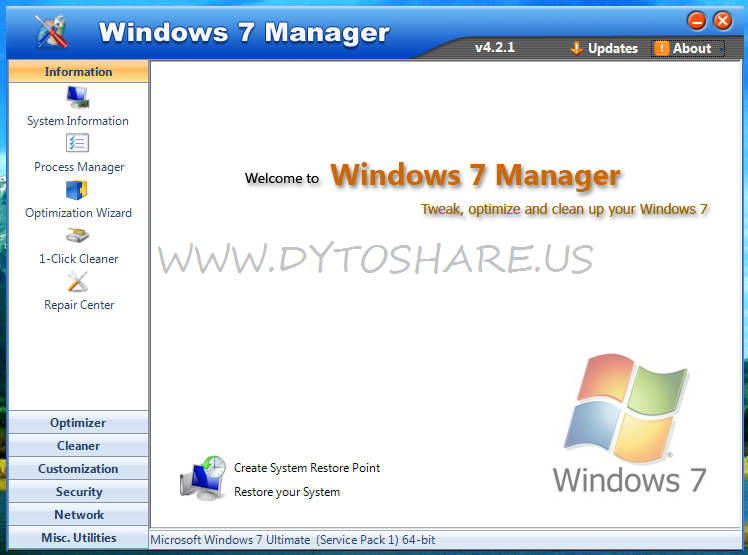

What's New ? :
- Smart Uninstaller updated to v3.4
- Registry Cleaner updated to v5.7
- 1-Click Cleaner updated to v2.8
Features :
Click Show To See All Features
Download :
- Download | Installer + Keygen (9,3 MB)
- Mirror | Installer + Keygen (9,3 MB)
- Download | Keygen Only (370 KB)
Semoga Bermanfaat
^_^
Rating: 4.5
Reviewer: Unknown
ItemReviewed: Yamicsoft Windows 7 Manager 4.2.1 + Keygen Patch

Data anda hilang ? coba software yang satu ini. EaseUS Data Recovery Wizard Professional 5.8.0 adalah software untuk mengembalikan data-data yang sudah hilang, baik karena tidak sengaja terhapus, karena format partisi, maupun serangan virus.yang dapat menyebabkan data menjadi hilang. Data dapat dikembalikan, meskipun partisi sudah hilang, atau di format.
Screenshoot :


Features :
- Supports IDE / ATA, SATA, SCSI, USB, hard drive cable (IEEE1394) Fire and other media such as Floppy disk, USB flash drive, digital camera, digital audio player, etc.
- Creates a Disk Image file for the updates. Recover multiple file formats like photos, videos, musics, office documents, emails, zip/rar, archives, etc.
- Restoring a single click.Faster scan lost files by skipping bad sectors automatically.
- Provides updated separation from FAT12, FAT16, FAT32, file system NTFS.Returns the deleted files and folders even after the Recycle Bin has been emptied.
- Preview the update files and pictures in BMP, EMF, JPG, JPEG, GIF, TIF and format PNG, etc.Recover files from unreadable Dynamic Disk.
- Recover Linux files in Windows Systems.
- Preview recoverable files.
Download :
- Installer + Serial
- Download File : Download
- Size : 6 MB
Semoga Bermanfaat
^_^
Rating: 4.5
Reviewer: Unknown
ItemReviewed: EaseUS Data Recovery Wizard Professional 5.8.0 + Serial
.jpg)
New Added Softwares, Updated Functions:
- BattStat 0.99b: Battery Status monitor and power management freeware for Windows 7/Vista/XP/2000 x86/x64.
- BrowsingHistoryView 1.05: To view history data of Internet Explorer, Mozilla Firefox, Google Chrome, and Safari Web browsers in one table.
- ClearLock 1.4.0: To lock your desktop with a transparent layer, allowing you to see what is happening on your desktop and at the same time prevent access to the computer without the proper password.
- DRevitalize 1.2: Repairs bad sectors (physical defects) on hard drives by generating a special sequence of high and low signals around the physically damaged area.
- EncFS 1.7.4: This should be used for secure online file backup services such as Google Drive, Dropbox and Sugarsync as the encryption do not occupy a fixed size containers and backup programs can copy encrypted files and can be accessed from linux, iPhone/iOS and android using BoxCryptor and Cryptonite.
- ImDisk 1.6.0: To create/mount virtual hard disk, floppy or CD/DVD drives using image files or system memory.
- MBRCheck 1.2.3: Checks the legitimacy of the Master Boot Record (MBR) code of the hard drives.
- McAfee Removal Tool 6.0.152.0: McAfee Consumer Product Removal Tool removes all 2005 – 2012 versions of McAfee products.
- MiniXP: Added/updated Storage/LAN/WLAN drivers and other minor improvements, iso boot works, path can be changed in HBCD\XP\X using notepad.
- Norton Removal Tool 20.0.0.21: SymNRT uninstalls most Norton AntiVirus, Norton Internet Security, Norton 360, and Norton SystemWorks even when the uninstaller fails to remove them.
- Remove Non Present Drivers: Automatically remove all non-present/disconnected devices from a Windows and can often be useful to prevent misbehaving/unnecessary drivers from being loaded, cleanup drivers when you replaced motherboard or used backup image of different hardware.
- Tor Browser 2.2.39: Surf the internet anonymously through encryption, even https sites can be browsed safely where it is blocked by your local ISP.
- WifiInfoView 1.05: Wireless networks information including Network Name (SSID), MAC Address, PHY Type (802.11g or 802.11n), RSSI, Signal Quality, Frequency, Channel Number, Maximum Speed, Company Name, Router Name/Model and more.
- Windows Product Key Update Tool 1.7: This tool is from microsoft to change the key of illegal/pirated installed xp to legit xp keys from the sticker on the PC, even if it is oem and not retail/corporate.
Screenshots

Download
Mirror
Rating: 4.5
Reviewer: Unknown
ItemReviewed: Hiren’s BootCD 15.2

Setelah Windows 7, kini Yamicsoft Windows Manager hadir untuk Windows 8. Yamicsoft Windows 8 Manager v1.0.3 + Keygen Patch memiliki fungsi yang sama seperti Windows 7 Manager, yaitu untuk mengoptimalkan kinerja windows, seperti membersihkan file-file sampah, hingga merepair Windows 8 yang error juga bisa, serta software ini juga memiliki fitur-fitur lain selain itu.
Screenshoot :

Download :
#Tested By Me - Windows 8 Enterprise 64-bit
Semoga Bermanfaat
^_^
Rating: 4.5
Reviewer: Unknown
ItemReviewed: Yamicsoft Windows 8 Manager v1.0.3 + Keygen Patch
 Siapa yang tak kenal Nero, software yang terkenal dengan software untuk burning CD/DVD ini memang sangat digemari oleh kebanyakan orang. Namun rasanya kurang mantap jika Nero kita gunakan hanya untuk urusan Burning saja. Dengan Nero 12 Platinum HD ini anda bukan hanya bisa memburning CD/DVD melainkan bisa anda gunakan untuk Convert, Edit Video, Desain Cover, Backup, dan sebagainya.
Screenshot :
.jpg)
Download Software (Via Mediafire = 291 MB : 2 Part) :
- Part 1 | Setup - Nero Multimedia Plantinum HD 12 - (200 MB)
- Part 2 | Setup - Nero Multimedia Plantinum HD 12 - (91.42 MB)
- Password (if need) : www.dytoshare.us
Download Patch (Via Sharebeast) :
#Tested By Me @Windows 7 Ultimate 64 Bit

Jika ada masalah contact YM dibawah ini
Semoga Bermanfaat
^_^
Rating: 4.5
Reviewer: Unknown
ItemReviewed: Nero Multimedia Platinum HD 12 + Patch

Screenshot :

Download :
- Download | Stellar Phoenix Windows Data Recovery v5.0 Pro - (3,2 MB)
- Password : www.dytoshare.us
Stellar Phoenix Windows Data Recovery Features:
New for version 5:
An award winning Windows data recovery software from Stellar Phoenix that recovers lost/deleted data from Windows – based computers. Helps recover data in case of data loss due to hard drive corruption or formatting, virus attack.
New for version 5:
- Optical media recovery
- Media recovery
- Recovers large drives (up to 2TB)
- On the fly media detection
- Improved scan engine for FAT, NTFS and exFAT partitions
- Enhanced file tree view speed
- Improved preview, RAW recovery, deleted file recovery and advanced scan
- Recovers lost or deleted or inaccessible data from Windows Operating System based hard disk drive and other storage media
An award winning Windows data recovery software from Stellar Phoenix that recovers lost/deleted data from Windows – based computers. Helps recover data in case of data loss due to hard drive corruption or formatting, virus attack.
- Recovers lost/deleted data and also data lost due to formatting or corruption of partitions of data storage devices such as, internal/external hard disks, USB drives etc.
- Supports recovery of more than 185 different file types
- Compatible with Windows 7, Vista, Server 2003, XP, 2000, and NT4 (SP6)
# Tested
Semoga Bermanfaat
^_^
Rating: 4.5
Reviewer: Unknown
ItemReviewed: Stellar Phoenix Windows Data Recovery v5.0 Professional

ScreenShot

Download [JumboFiles]


#Tested on Windows 7 Ultimate x86 (32bit)
Rating: 4.5
Reviewer: Unknown
ItemReviewed: PC Tools File Recover 9.0.1.221 - Full Keygen

Screenshot :

Download :
- Download | R-Studio 6.1 Build 152019 Network Edition incl. Patch - (28 MB)
- Mirror| R-Studio 6.1 Build 152019 Network Edition incl. Patch - (28 MB)
- Download | R-Studio 6.1 Build 152019 Network Edition Patch Only - (262 KB)
- Password : www.dytoshare.us
R-Studio Features :
- Standard Windows Explorer - style interface.
- Host OS: Windows 9x, ME, NT, 2000, XP, 2003 Server, Vista, 2008 Server, Windows 7.
- Data recovery over the Network. Files can be recovered on network computers running Win95/98/ME/NT/2000/XP/2003/Vista/2008/Windows 7, Macintosh, Linux, and UNIX.
- Supported file systems: FAT12, FAT16, FAT32, exFAT, NTFS, NTFS5 (created or updated by Win2000/XP/2003/Vista/2008/Win7), HFS/HFS+ (Macintosh), Little and Big Endian variants of UFS1/UFS2 (FreeBSD/OpenBSD/NetBSD/Solaris) and Ext2/Ext3/Ext4 FS (Linux).
- Recognition and parsing Dynamic (Windows 2000/XP/2003/Vista/2008/Win7), Basic(MBR) and BSD (UNIX) partitions layout schema and Apple partition map. Dynamic partitions over GPT are supported as well as dynamic partitions over MBR.
- Damaged RAID recovery. If the OS cannot recognize your RAID, you can create a virtual RAID from its components. Such virtual RAID can be processed like a real one.
- Creates IMAGE FILES for an entire Hard Disk, Partition or its part. Such image files can be compressed and split into several files to put it on CD/DVD/flash or FAT16/FAT32/exFAT. Then the image files can be processed like regular disks.
- Data recovery on damaged or deleted partitions, encrypted files (NTFS 5), alternative data streams (NTFS, NTFS 5).
- Recovering data if:
- FDISK or other disk utilities have been run;
- VIRUS has invaded; FAT is damaged; MBR is destroyed.
- Recognizes localized names.
- Recovered files can be saved on any (including network) disks accessible by the host operating system.
- File or disk content can be viewed and edited with the advanced hexadecimal editor. The editor supports NTFS file attribute editing.
System Requirements :
- An Intel-compatible platform running Windows 9x/ME/NT4.0/2000/XP/ 2003/Vista/2008/ Windows 7.
- At least 32 MB of RAM, a mouse, and enough disk space for recovered files, image files, etc.
- The administrative privileges are required to install and run R-Studio utilities under WinNT/2000/XP/ 2003/Vista/2008/ Windows 7.
- A network connection for data recovering over network.
# Tested : Windows 7 Ultimate 64 Bit
Semoga Bermanfaat
^_^
Rating: 4.5
Reviewer: Unknown
ItemReviewed: R-Studio 6.1 Build 152019 Network Edition - Full Patch


