Tampilkan postingan dengan label htaccess. Tampilkan semua postingan
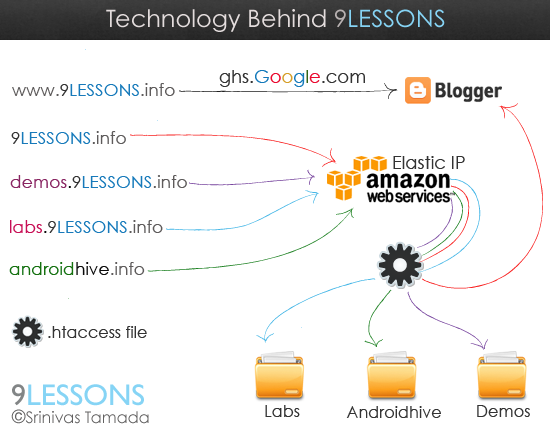
Recent days I received lots for requests from my readers that asked to me few questions about 9lessons.info hosting and CMS technology. This post explains you how do I setup my domains + sub domains with Blogger and Amazon EC2 hosting. How to setup multi domains setup in Amazon Elastic Compute Cloud using htaccess file.
Rating: 4.5
Reviewer: Unknown
ItemReviewed: Amazon EC2 Multi Domain Setup and Technology Behind 9lessons
This post explains how to create SEO friendly URL with dynamic content using PHP and .htaccess mod redirection. Friendly URLs improves your site search engines ranking. Before trying this you have to enable mod_rewrite.so module at httpd.conf. It’s simple just few lines of PHP code converting title data to clean URL format.

Rating: 4.5
Reviewer: Unknown
ItemReviewed: SEO Friendly URLs with PHP
How to use .htaccess file inside the folder. I'm using two .htaccess files in my hosting, one for labs.9lessons and another for touch.9lessons. Just take a look at this post how I had implemented.

Rating: 4.5
Reviewer: Unknown
ItemReviewed: Htaccess File Inside The Folder.
In this post I want to explain " How to redirect the sub domain to a sub folder with .htaccess". I had implemented this for labs.9lessons.info and demos.9lessons.info. I hope it is useful for you.

Rating: 4.5
Reviewer: Unknown
ItemReviewed: Redirect The Sub Domain To a Sub Folder with .htaccess
Some days back I had posted "Pretty URLs with .htaccess rewriting tips". In this post I had given one more pretty URL tip with .htaccess tip. I hope it's useful for you.

Rating: 4.5
Reviewer: Unknown
ItemReviewed: URL Rewriting Tip with .htaccess File
Pretty URLs always helps you to boost up search engine page ranking. In this post I want to explain about URLs rewriting techniques using .htaccess file. Friendly URLs looks neat on the browser address bar. Take a look at live demo

Rating: 4.5
Reviewer: Unknown
ItemReviewed: Pretty URLs with .htaccess Rewriting Tips.
Some days back I published an article about SQL Injection. In this article very small discussion about .htaccess file. After lots of requests I publish this article to add more security to your php application using .htaccess file.
In this tutorial I want to explain about hiding .php extensions and URL rewriting. So improve your Web projects security and quality.

Making .htaccess file
Very simple open any editor like notepad just file save as into .htaccess with in double quotations(".htacess"). You have to upload this file in to hosting root folder, my experience .htaccess file supports only Unix based servers.

 Download Sample .htaccess File
Hide .php extension with URL Rewriting
For example if we want to project like Twitter API URLs (Note: Twitter API Developed in Ruby on Rails)

Add this following code in your .htaccess file
RewriteEngine on
RewriteRule ^(.*)\$ $1.php
RewriteRule ^(.*)\$ $1.php
We can Rewrite index.php into index.html,index.asp,index.sri also

Below code for index.php to index.html
RewriteEngine on
RewriteRule ^(.*)\.html$ $1.php
If you want .asp extension just replace html to aspRewriteRule ^(.*)\.html$ $1.php
Redirecting www URL to non www URL
If you type www.twitter.com in browser it will be redirected to twitter.com.

Add this Following Code:
RewriteEngine On
RewriteCond %{HTTP_HOST} ^www.srinivas.com
RewriteRule (.*) http://srinivas.com/$1 [R=301,L]
RewriteCond %{HTTP_HOST} ^www.srinivas.com
RewriteRule (.*) http://srinivas.com/$1 [R=301,L]
Rewriting 'site.com/profile.php?username=foxscan' to 'site.com/foxscan'
My twitter profile http://twitter.com/foxscan its original link passing GET values (http://twitter.com/profile.php?username=foxscan) but this URL is ugly in browser address bar, For user friendly we can change like this.

RewriteEngine On
RewriteRule ^([a-zA-Z0-9_-]+)$ profile.php?username=$1
RewriteRule ^([a-zA-Z0-9_-]+)/$ profile.php?username=$1
RewriteRule ^([a-zA-Z0-9_-]+)$ profile.php?username=$1
RewriteRule ^([a-zA-Z0-9_-]+)/$ profile.php?username=$1
Download Sample .htaccess FileIf any suggestions post a Comment.
Rating: 4.5
Reviewer: Unknown
ItemReviewed: Add Security to your PHP projects using .htaccess file


