Tampilkan postingan dengan label XML. Tampilkan semua postingan

Jika kita memiliki Website atau Blog RSS sangat penting agar pengunjung setia kita tetap memiliki update terhadap informasi yang disampaikan di web atau blog kita. Berikut sedikit langkah untuk membuat RSS sesuai kebutuhan informasi yang akan disampaikan.
Sebelumnya harus dipahami struktur standar dari RSS feed dan dapat dilihat di "The Anatomy of an RSS Feed". Jika kita telah memiliki struktur database yang ada pada website kita maka kita dapat mengambil beberapa field dari database itu untuk digunakan dalam RSS feed yang dibuat, dalam kesempatan ini dibuat contoh struktur database sebagai berikut :
1. Tabel dari RSS item :
CREATE TABLE `webref_rss_items` (2. Tabel dari detail isi RSS item
`id` int(11) NOT NULL auto_increment,
`title` text NOT NULL,
`description` mediumtext NOT NULL,
`link` text,
PRIMARY KEY (`id`)
) ENGINE=MyISAM DEFAULT CHARSET=utf8;
CREATE TABLE `webref_rss_details` (Setelah menambahkan dan mengisi beberapa dari kedua tabel di atas berikut adalah Buat konektor PHP ke mysql, simpan dengan nama "koneksi_mysql.php" :
`id` int(11) NOT NULL auto_increment,
`title` text NOT NULL,
`description` mediumtext NOT NULL,
`link` text,
`language` text,
`image_title` text,
`image_url` text,
`image_link` text,
`image_width` text,
`image_height` text,
PRIMARY KEY (`id`)
) ENGINE=MyISAM DEFAULT CHARSET=utf8;
<?php

DEFINE ('DB_USER', 'username_anda');
DEFINE ('DB_PASSWORD', 'password_anda');
DEFINE ('DB_HOST', 'localhost');
DEFINE ('DB_NAME', 'nama_database');

$dbc = @mysql_connect (DB_HOST, DB_USER, DB_PASSWORD) OR die ('Could not connect to MySQL: ' . mysql_error() );
mysql_select_db (DB_NAME) OR die ('tidak dapat terkoneksi ke database: ' . mysql_error() );

?>
Setelah itu maka dibuat sebuah PHP class untuk memindahkan data di MySQL ke RSS feed yang berbentuk XML, disimpan dengan nama rss.class.php :
<?php

class RSS
{
 public function RSS()
 {
  require_once ('direktori dari.../koneksi_mysql.php');
 }

 public function GetFeed()
 {
  return $this->getDetails() . $this->getItems();
 }

 private function dbConnect()
 {
  DEFINE ('LINK', mysql_connect (DB_HOST, DB_USER, DB_PASSWORD));
 }

 private function getDetails()
 {
  $detailsTable = "webref_rss_details";
  $this->dbConnect($detailsTable);
  $query = "SELECT * FROM ". $detailsTable;
  $result = mysql_db_query (DB_NAME, $query, LINK);

  while($row = mysql_fetch_array($result))
  {
   $details = '<?xml version="1.0" encoding="ISO-8859-1" ?>
     <rss version="2.0">
      <channel>
       <title>'. $row['title'] .'</title>
       <link>'. $row['link'] .'</link>
       <description>'. $row['description'] .'</description>
       <language>'. $row['language'] .'</language>
       <image>
        <title>'. $row['image_title'] .'</title>
        <url>'. $row['image_url'] .'</url>
        <link>'. $row['image_link'] .'</link>
        <width>'. $row['image_width'] .'</width>
        <height>'. $row['image_height'] .'</height>
       </image>';
  }
  return $details;
 }

 private function getItems()
 {
  $itemsTable = "webref_rss_items";
  $this->dbConnect($itemsTable);
  $query = "SELECT * FROM ". $itemsTable;
  $result = mysql_db_query (DB_NAME, $query, LINK);
  $items = '';
  while($row = mysql_fetch_array($result))
  {
   $items .= '<item>
       <title>'. $row["title"] .'</title>
       <link>'. $row["link"] .'</link>
       <description><![CDATA['. $row["description"] .']]></description>
      </item>';
  }
  $items .= '</channel>
     </rss>';
  return $items;
 }

}

?>
Yang terakhir adalah memanggil PHP class yang telah dibuat di atas kedalam XML agar dapat melihat RSS feed, simpan dengan nama feed.xml :
<?php
 header("Content-Type: application/xml; charset=ISO-8859-1");
 include("direktori file.../rss.class.php");
 $rss = new RSS();
 echo $rss->GetFeed();
?>
Catatan :
- Agar Apache Webserver dapat mengkompile script php yang berada dalam file feed.xml, dengan menambahkan baris "AddHandler application/x-httpd-php .xml".
- Cek terlebih dahulu apakah RSS dapat dibaca atau tidak di website RSS validator seperti validator.w3.org.
Demikian sharing mengenai Membuat RSS feed dengan PHP dan MySQL, semoga dapat digunakan dengan baik
Rating: 4.5
Reviewer: Unknown
ItemReviewed: Membuat RSS feed dengan PHP dan MySQL
This post explains how to create RSS feed for web projects with PHP. It's simple code just you have to include the basic RSS stucture in while loop.

Rating: 4.5
Reviewer: Unknown
ItemReviewed: Generate RSS Feed with PHP.
This article explains to displaying RSS(XML format) feed like popurls.com (popular urls in one place) using simplexml_load_file() a PHP function. It's very useful to display your blog feeds as like Recent articles(headlines) list.
RSS- Really Simple Syndication.
Reading XML data and presenting with HTML.

 Download Script
  Live Demo
Index.php RSS display page:
File contains HTML tags and PHP included rssclass.php. You have to change the RSS feed URL.
<div>
  <?php
  include('rssclass.php');
  $feedlist = new rss('http://feeds2.feedburner.com/9lesson');
  echo $feedlist->display(9,"9lessons");

  $feedlist = new rss('http://feeds.feedburner.com/nettuts');
  echo $feedlist->display(9,"Nettuts");

  $feedlist = new rss('http://feeds.labnol.org/labnol');
  echo $feedlist->display(9,"Labnol");
  ?>
  </div>

rssclass.php
A beautiful PHP function simplexml_load_file() to load and read XML file. simplexml_load_string() XML string reader.
<?php
 class rss {
     var $feed;

  function rss($feed)
    {   $this->feed = $feed;  }

  function parse()
    {
    $rss = simplexml_load_file($this->feed);
    $rss_split = array();
    foreach ($rss->channel->item as $item) {
    $title = (string) $item->title; // Title
    $link   = (string) $item->link; // Url Link
    $description = (string) $item->description; //Description
    $rss_split[] = '<div>
        <a href="'.$link.'" target="_blank" title="" >
            '.$title.'
        </a>
   <hr>
          </div>
';
    }
    return $rss_split;
  }
  function display($numrows,$head)
  {
    $rss_split = $this->parse();

    $i = 0;
    $rss_data = '<div class="vas">
           <div class="title-head">
         '.$head.'
           </div>
         <div class="feeds-links">';
    while ( $i < $numrows )
   {
      $rss_data .= $rss_split[$i];
      $i++;
    }
    $trim = str_replace('', '',$this->feed);
    $user = str_replace('&lang=en-us&format=rss_200','',$trim);
    $rss_data.='</div></div>';
    return $rss_data;
  }
}
?>
CSS code :
Style just view the Live Demo
.vas{
    float:left;
    width:270px;
    padding:10px;
}
.title-head {
    font-size:18px;
    font-weight:bold;
    text-align:left;
    background-color:#006699;
    color:#FFFFFF;
    padding:5px;}
.feeds-links {
    text-align:left;
    padding:5px;
    border:1px solid #dedede;
 }
Download Script Live DemoRating: 4.5
Reviewer: Unknown
ItemReviewed: Displaying RSS Feed with PHP
Web.xml mapping servlet names improve web app's flexibility and security..The deployment descriptor (DD), provides a "declarative" mechanism for customizing your web applications without touching source code!
Tomcat Directory Structure

Login.java
import javax.servlet.*;
import javax.servlet.http.*;
import java.io.*;
public class Login extends HttpServlet{
public void doGet(HttpServletRequest request,
HttpServletResponse response)throws IOException{
PrintWriter out=response.getWriter();
java.util.Date tody=new java.util.Date();
out.println("out put html tags");
}
}
<servlet>Maps internal name to fully-qualified class name.
<servlet-mapping>Maps internal name to public URL name.
web.xml
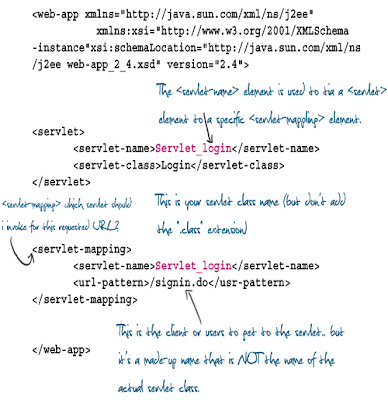
<servlet-mapping> which servlet should i invoke for this requested URL?
<web-app xmlns="http://java.sun.com/xml/ns/j2ee"
xmlns:xsi="http://www.w3.org/2001/XMLSchema-instance"
xsi:schemaLocation="http://java.sun.com/xml/ns/j2ee web-app_2_4.xsd" version="2.4">
<servlet>
<servlet-name>Servlet_login</servlet-name>
<servlet-class>Login</servlet-class>
</servlet>
<servlet>
<servlet-name>Servlet_inbox</servlet-name>
<servlet-class>inbox</servlet-class>
</servlet>
<servlet-mapping>
<servlet-name>Servlet_login</servlet-name>
<url-pattern>/signin.do</usr-pattern>
</servlet-mapping>
<servlet-mapping>
<servlet-name>Servlet_inbox</servlet-name>
<url-pattern>/view.do</usr-pattern>
</servlet-mapping>
</web-app>
signin.do file mapping to Login.class. So the client or users to get to the servlet.. but it's a made-up name that is NOT the name of the actual servlet class.

Tomcat Directory Structure

Login.java
import javax.servlet.*;
import javax.servlet.http.*;
import java.io.*;
public class Login extends HttpServlet{
public void doGet(HttpServletRequest request,
HttpServletResponse response)throws IOException{
PrintWriter out=response.getWriter();
java.util.Date tody=new java.util.Date();
out.println("out put html tags");
}
}
<servlet>Maps internal name to fully-qualified class name.
<servlet-mapping>Maps internal name to public URL name.
web.xml

<servlet-mapping> which servlet should i invoke for this requested URL?
<web-app xmlns="http://java.sun.com/xml/ns/j2ee"
xmlns:xsi="http://www.w3.org/2001/XMLSchema-instance"
xsi:schemaLocation="http://java.sun.com/xml/ns/j2ee web-app_2_4.xsd" version="2.4">
<servlet>
<servlet-name>Servlet_login</servlet-name>
<servlet-class>Login</servlet-class>
</servlet>
<servlet>
<servlet-name>Servlet_inbox</servlet-name>
<servlet-class>inbox</servlet-class>
</servlet>
<servlet-mapping>
<servlet-name>Servlet_login</servlet-name>
<url-pattern>/signin.do</usr-pattern>
</servlet-mapping>
<servlet-mapping>
<servlet-name>Servlet_inbox</servlet-name>
<url-pattern>/view.do</usr-pattern>
</servlet-mapping>
</web-app>
signin.do file mapping to Login.class. So the client or users to get to the servlet.. but it's a made-up name that is NOT the name of the actual servlet class.

Rating: 4.5
Reviewer: Unknown
ItemReviewed: Web.xml Deployment Descriptor


