Tampilkan postingan dengan label Widgets. Tampilkan semua postingan

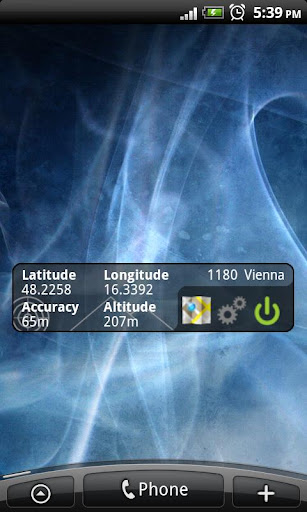
This widget simply shows your current location in numbers!

GPS Widget Pro play.google.com.gpswidgetpro
This widget simply shows your current location in numbers. Latitude and Longitude are received from the GPS location provider or from the network location provider if GPS is not available.
The altitude is queried from open MapQuest API which yields in a more accurate result than receiving the altitude by GPS. So this widget is also interesting for hiking (altimeter).
Features:
- Display your current location in numbers
- Additional information (Street, City, Postal Code, GPS satellite fix)
- Shows your altitude with high accuracy
- Share your location with friends via SMS, Email, etc.
- Different location formats are supported (Decimal Degrees, Universal Transverse Mercator (UTM), ...)
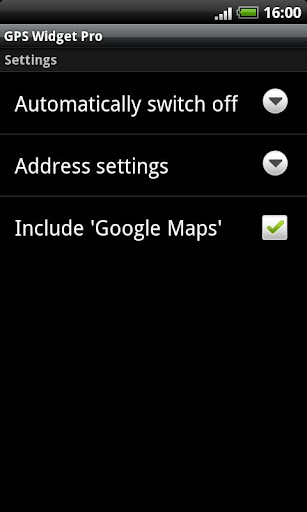
- To save battery power you should switch off the widget when you do not need it. You can force the widget to switch off automatically after some time in the settings.
- This is no GPS toggle widget. You can not turn on and off GPS. You simply get clear information about your current location.
The widget needs the following permissions because:
- Your location: it's obvious ;-)
- Network communication: query altitude
What's in this version : (Updated : Mar 5, 2013)
- MapQuest API changed: altitude works again
Required Android O/S : 2.1+
Screenshots :

Rating: 4.5
Reviewer: Unknown
ItemReviewed: GPS Widget Pro v1.2.13 APK

HD Metallic Widgets provides you a new elegant experience of home screen!

HD Metallic Widgets R2play.google.com.metallicwidgets
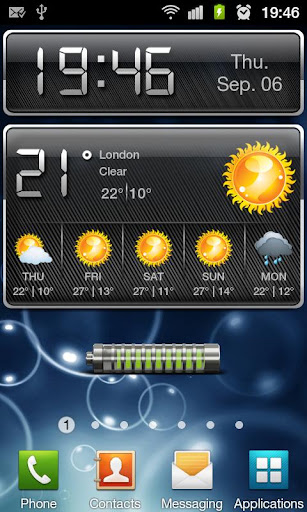
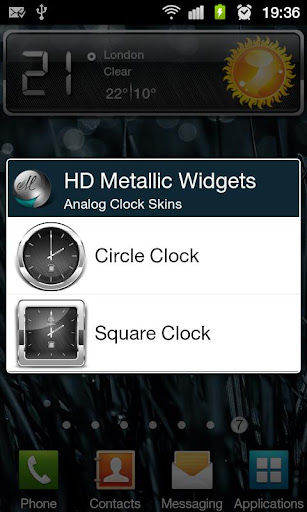
This set of widget includes weather widget, digital clock widget, analog clock widget, battery widget and switches widget, all in one package.
What makes these widgets unique is not only its elegant style, but also it is optimized approach in battery usage, and also it is easy to use.
Through this package you will have access to:
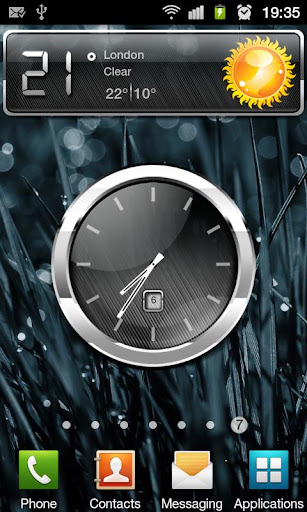
- Analog Clock, which is available in both Circle and Square shapes. This widget also shows the current day of the month. Also it display in 3 X 3 size.
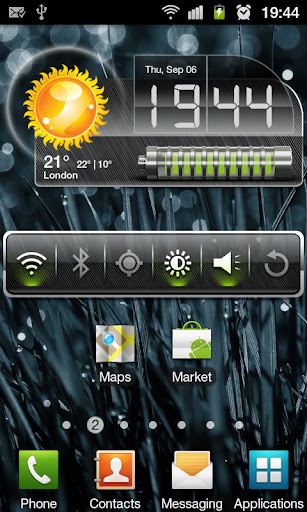
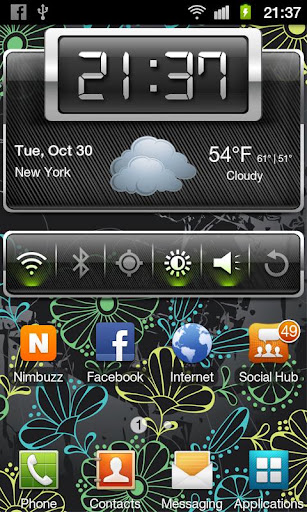
- Digital Clock, will show the time and current date. Also it displays in 4 X 1 size.
- Battery Widget, it’s shown in two different sizes, the large one is in 4 X 1 size and small one in 2 X 1 size. This widget let you know the status of the battery via its shape and its color. When you plug in the charger, it will show you the progress of charging.
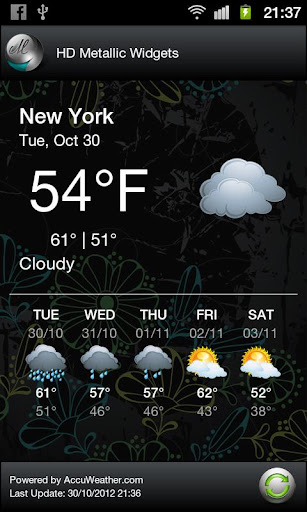
- Weather Widget, in its small size (4 X 1) will automatically detect your location, and based on that, display the current degree, minimum and maximum degree of the day and explain you the weather condition. The large size (4 X 2) will have the same functionality as the small one, and will display the weather condition of four next added days. If you need to update weather widget manually, you just touch the widget and in the opened window you can refresh it.
- Switch Widget, provides you a fast way to turn on/off some useful functionalities like Wi-Fi, Bluetooth, GPS, Screen Brightness, Silent mode and Auto Rotation, also is available in 4 X 1 size.
- Composed Widget, it’s made by composing Weather, Date & time and Battery widget. If you need to update weather widget manually, you can touch the weather part and in the opened window you can refresh it.
- 500 MHz + CPU
- MDI Screen
- Please check the “Use wireless networks” in your device “Settings/Location and security” to improve location-finding functions
- Please after installing the new version remove the widgets from the screen and then add them again.
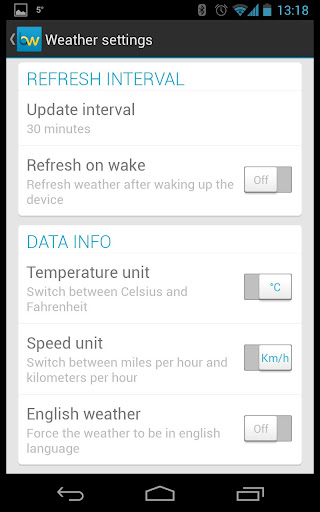
- Option to showing degree in Celsius or Fahrenheit
- Option to showing time in 12/24 format
- Auto Refresh mode for forecast
- Refresh Interval for forecast
- New look for weather screen
- New Composed widget (Time + date + weather)
- More weather icons to show exact result
Required Android O/S : 2.1+
Screenshots :
Rating: 4.5
Reviewer: Unknown
ItemReviewed: HD Metallic Widgets R2 v5.2 APK

Beautiful clock widgets!
Beautiful Clock Widget Proplay.google.com.clockwigetpro
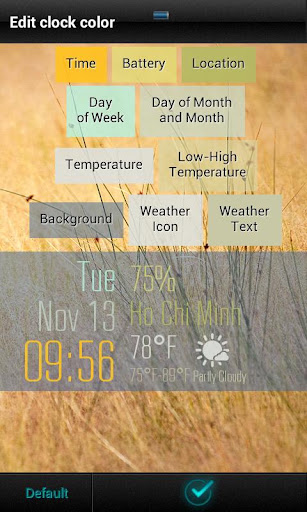
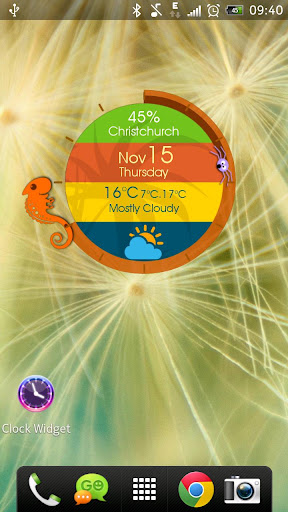
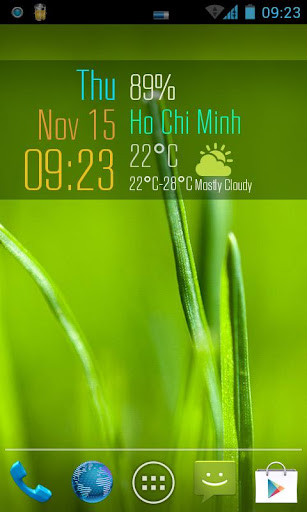
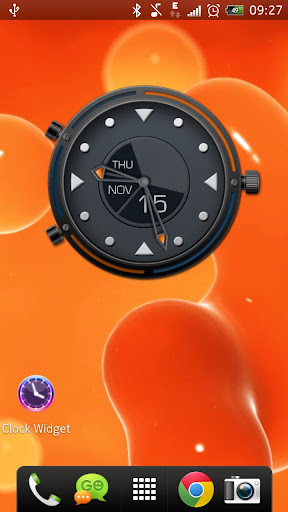
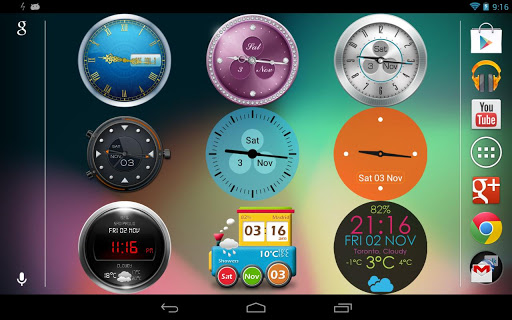
Beautiful Clock Widget is the most beautiful clock widget on Android home screen. It includes a collections of clock widget with optional weather and battery information
Features
- Fully customization (background colors, hand colors, text colors, etc)
- Different sizes (2x2, 4x2, 4x3) and resizable on some launchers (ex. Nova launcher)
- Over 45 themes (digial clock, analog clock, typography clock, animal, dual)
- Auto-update timezone/location
- Auto-update weather, battery information
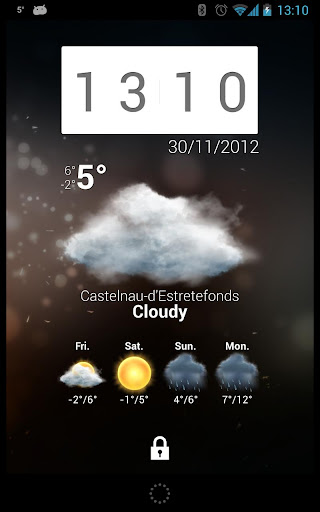
- Lock screen widget (Jelly Bean 4.2)
- Added languages: Arabic, Bulgarian, Polish, Romanian
- Fixed minor bugs
- Add one more weather provider - World Weather Online
Required Android O/S : 2.0.1+
Screenshots :
Rating: 4.5
Reviewer: Unknown
ItemReviewed: Beautiful Clock Widget Pro v1.7 APK

Beautiful set of widgets including clock+weather, with some toggles

Beautiful Widgets play.google.com.beautifulwidgets
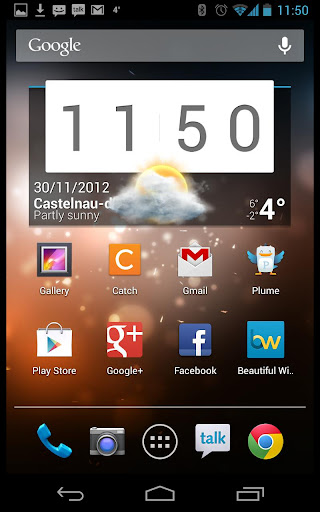
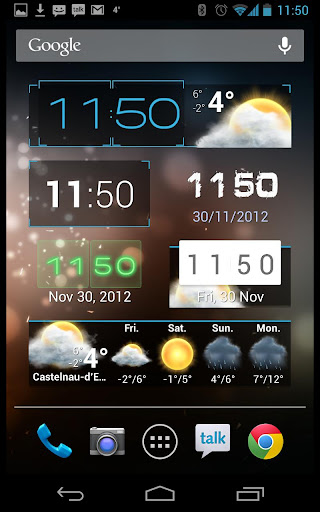
Beautiful set of Widgets containing clock widget, clock and weather widget, weather widgets, date widgets and toggle widgets with skins/themes support!
Selected by Google as an Android Editor's choice and first paid application to reach 1 million of downloads! What a success driven by its community!
See why it is the best Android clock and weather widgets and the only choice for thousands of users! You probably heard of Beautiful Widgets before!
Now with Honeycomb tablets support (ie the Motorola Xoom, Galaxy Tab)!
Now with Honeycomb tablets support (ie the Motorola Xoom, Galaxy Tab)!
- High Definition Super Clock HD widgets available in many sizes and many layouts (also resizable on Android > 3.0). High quality rendering and resizable with no loss of quality!
- Display either the weather, battery icon (both with skins) or just a clock on the widget.
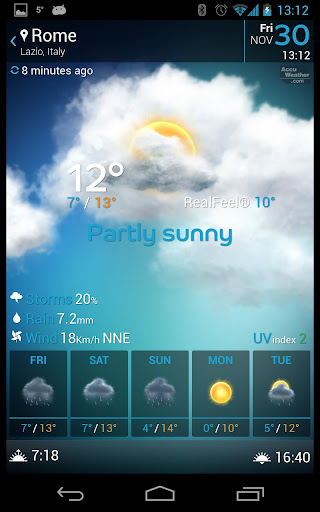
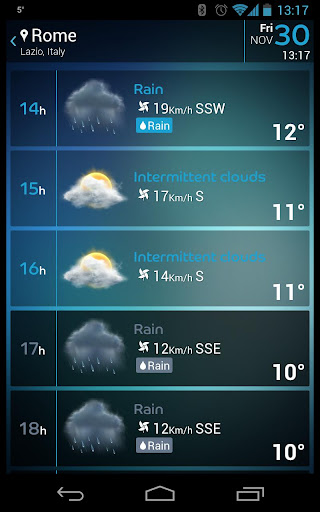
- 5 days Weather Forecast based on Google weather or Accuweather, with Geolocation support, automatic sunset/sunrise, also available on a weather only widget.
- Support multiple locations for the forecast, so you always know the weather for any others places
- Weather alerts (USA only), storm/rain/snow forecasts
- More than 15 nice Weather Animations (rain, storm, etc) for your pleasure when tapping the weather icon from the widgets.
- Moon phases, actual and a calendar for the next 4/5 phases
- Nice toggle widgets for Wifi, Bluetooth, Mobile, Brightness, GPS (shortcut), Silent, Vibrate, Plane Mode, 4G (only for a few HTC devices), Rotate, Pattern (below android 2.2) and a Timed Silence!
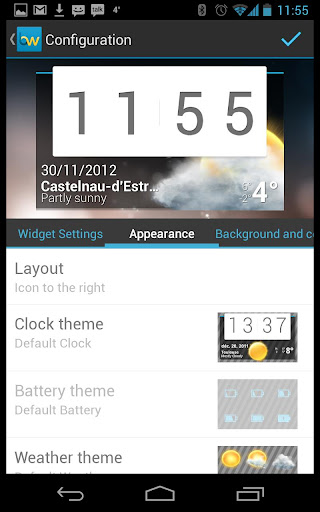
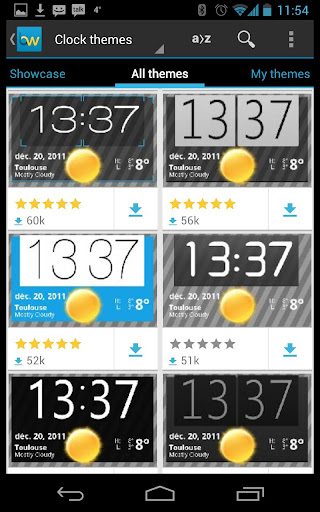
- More than 1000+ FREE Skins/Themes to changes the look and feel of you clock, weather icons or toggle buttons ! Impress your friends with your clock widget!
- Weather Live Wallpaper OpenGL accelerated (for supported devices only) which allow to display the weather live from your wallpaper, with many effects, physics and interactions!
- Auto-refresh weather on widgets when your phone is unlocked
- Define applications to launch when tapping the hours, date or forecast details from the widgets so you can access the most important applications very easy from our beautiful widgets.
- Introducing Beautiful Today widget which display the date using the same look as the Super Clock
- Temperature displayed in your notification bar, with access to the weather forecast. Now with the Ice Cream Sandwich look & feel if you are on Android 4.0!
- Web Skin Market with cloud to device communication: browse skins from your computer and apply it directly to your phone along with a new wallpaper!
- Web Skin Mixer: create your own customized skins from the elements of the others skins
- Many options in order to create your own experience!
- Super Clock HD widget with weather, battery or just the clock 4x3 4x2 4x1 2x1 5x3
- Weather only widget 4x1 1x1
- Battery widget 1x1
- Date widget 2x1 1x1
- Text Clock simple widget 2x1
- Toggles widgets 1x1
- Home widgets with clock and weather and 300 skins 4x1 2x1
- New weather provider WeatherUnderground
- New Forecast Fragment Lifestyles
- New widgets for tablets
- New beta channel
- New layouts for WeatherWidgets 4x1
- Improve :
- The geolocation can be removed
- Add a setting to disable the weather animations
- Hide Home Fragment, and put Tutorial when there is no widgets
- New translations
- Physical menu button opens the Sliding menu in the Forecast Screen
- Fix a lot of bugs
Screenshots :
Rating: 4.5
Reviewer: Unknown
ItemReviewed: Beautiful Widgets v5.1.0 APK

Bismillah, selamat sore sobat blog semuanya. Pas tadi saya buka Blog saya ini ada pertanyaan dari Sabahat Blogger yaitu Alya Soraya yang menanyakan "gimana cara membuat widget buat menampilkan kategori berbentuk folder seperti yang ada pada direktori dmoz dsb". Sayapun terkejut yang di tanyakan Alya, Apa yang kaya gimana?? hehehe. Akhirnya saya memutuskan diri untuk keliling mencari solusi dan akhirnya Alhamdulillah saya menemukan yang mirip sekali dengan yang di tanyakan oleh Alya yaitu menampilkan kategori berbentuk folder, yang namanya Menu dTree. Mudah-mudahan jawaban ini atau postingan ini benar apa yang di tanyakan oleh Alya. Karena Menu dTree ini adalah menu yang menyerupai/mirip menu explore dan menu ini dapat kita tampilkan ke dalam web/blog kita.
Untuk memulai memasang menu dTree ini, seperti biasa silahkan Sobat login dulu ke akun Blogger Sobat. Lalu klik tata Letak >> Klik Edit HTML
1. Letakkan kode di bawah ini di atas kode </head>
<link rel="StyleSheet" href="https://sites.google.com/site/efekefek/file-js/dtree.css" type="text/css" />2. Kemudian klik Simpan Template
<script type="text/javascript" src="https://sites.google.com/site/efekefek/file-js/createdtree.js"></script>
Selanjutnya yang harus Sobat lakukan adalah menaruh kode HTML dTree ke dalam gadget sidebar Blog Sobat.
Caranya klik Tata Letak >> Tambah Gadget HTML dan taruh kode HTML berikut ini
<div class="dtree">
<p><a href="javascript: d.openAll();">Buka Semua</a> | <a href="javascript: d.closeAll();">Tutup Semua</a></p>
<script type="text/javascript">
<!--
d = new dTree('d');
d.add(0,-1,'Kang blog');
d.add(1,0,'Folder 01','#.html');
d.add(2,1,'Sub Folder 01',' #.html');
d.add(3,2,'Sub/file Sub Folder 01',' link anda.html');
d.add(4,0,'Folder 02',' #.html');
d.add(5,4,'Sub Folder 02',' #.html');
d.add(6,5,'Sub/file Sub folder 02',' link anda.html');
d.add(7,0,'Folder 03',' #.html');
d.add(8,7,'Sub Folder 03',' #.html');
d.add(9,8,'Sub/file Sub folder 03',' link anda.html','Pictures I've taken over the years','','','img/imgfolder.gif');
d.add(10,0,'File[non-folder]',' link anda.html');
d.add(11,0,'File[non-folder]',' link anda.html');
d.add(12,0,'File Single',' link anda.html','','','img/trash.gif');
document.write(d);
//--> </script>
</div>
Setelah di Copy Paste Simpan Gadget Sobat
Ok, kita mulai mengenal bagian mana saja yang harus kita atur untuk memulai membuat folder serta yang mana juga yang harus kita atur untuk membuat file saja. Untuk memulai mengenal bagian yang harus diatur dalam pembuatan folder dan file, agar parasobat hanya memperhatikan nomor-nomor yang telah saya tandai dengan warna-warna (untuk tulisan #.HTML, kita bahas setelah masalah nomor)
Nah, apakah parasobat bertanya apa maksud dari nomor2 yang acak2 itu? Sebenarnya itu bukan nomor acak2an, akan tetapi nomor unik yang tersusun rapi.
Coba parasobat perhatikan bedanya nomor yang berada di sisi kanan dan sisi kiri. Yang berada di sisi kiri sesuai dengan urutan:
1
2
3
dst
Sedangkan yang berada di sisi kanan gak beraturan.
Sebenarnya angka-angka tersebut dapat parasobat baca seperti berikut ini:
1 ,o ===>> Artinya adalah Folder Utama
2 ,1 ===>> Dan ini adalah Sub dari folder utama, oleh karena itu saya memberi warna angka satu dengan warna yang sama, yaitu merah. Kalau parasobat ingin menambahkan sub folder utama yang satu lagi di bawahnya, maka nanti teman2 tulis 3,1 atau d.add(3,1,'Sub Folder 02',' #.html'); (karena pada intinya folder tersebut masih mengikuti angka satu/folder utama)
3 ,2 ===>> Artinya adalah sub dari sub folder utama, bagian yang ini bisa jadi folder dan juga bisa jadi file. Apa maksudnya? Maksudnya adalah, pada intinya semua file yg memilki sub akan menjadi folder, sedangkan yg tidak memilki sub maka akan menjadi file selamanya (selama belum ada sub yang menumpang kepadanya), kalau parasobat bingung, sobat bisa memperhatikan preview/gambar di atas. Coba dilihat tuh, setiap jajaran ketiga pasti file kan? Nah itu karena yang jajaran ketiga adalah bagian yg terakhir alias bagian yg sudah tidak memilki sub lagi.
OK, untuk yg masalah pembuatan folder dan file selesai...
Selanjutnya masalah yang berada pada bagian kanan, yaitu tulisan " #.HTML" dan "Link anda.HTML"
Kenapa pada bagian yang saya tandai dengan warna merah saya beri tanda " #" bukannya menggunakan "Link anda"?
Itu semua karena terletak pada fungsi masing-masing. Apa maksudnya...
Maksudnya yang telah saya tandai dengan " #", artinya adalah folder utama atau folder sub utama. Dengan begitu para pengunjung langsung tahu kalau itu bukan file akan tetapi pengantar file alias folder. Ini semua merupakan pertimbangan saya pribadi, mungkin beberapa teman Blogger menganggap menu ini benar-benar mirip menu explorer, memang mirip tapi hanya tampilannya serta sifatnya yg menyerupai menu dropdown, akan tetapi bedanya pasti parasobat tahu. Kalau di menu explorer kita bisa membuka folder dengan cara mengklik tulisannya, misal: My Documents atau juga bisa dengan cara mengklik tanda plus-minus yang terletak pada samping kirinya. Akan tetapi untuk menu dropdown ini beda, kita hanya bisa mengklik tanda plus-minusnya saja untuk bisa menampilkan menu yg berada di dalamnya. Bagaimanaparasobat sudah ada bayangankan...?
Lalu untuk tulisan " link anda.HTML" itu bisa diganti dengan link Sobat. Dan pastikan kalau yang Sobat sisipi dengan link tersebut sudah merupakan sebuah link yg tidak bersub lagi, maksudnya bukan folder
Semoga bermanfaat
Rating: 4.5
Reviewer: Unknown
ItemReviewed: Cara Membuat Menu dTree di Blog
Clock Astronomy adalah Widget untuk Blog's atau Web anda silahkan pilih jenis widget Astronomy di bawah ini sesuai dengan keinginan Anda
. Dengan widget di bawah ini Blog atai Web Anda akan menjadi indah dan membuat pengunjung betah di blog kita, Insya Allah.
 |  |  |
 |  |  |
 |  |  |
| Code | Code | |
 |  |  |
Selamat mempunyai Clock Widget, mudah-mudahan dapat bermanfaat
Rating: 4.5
Reviewer: Unknown
ItemReviewed: Astronomy | Clock Widget
Widget Music ini mungkin akan sangat bermanfaat sekali bagi anda yang gemar mendengarkan musik. Khususnya bagi para blogger mania yang pecinta musik. Mungkin orang - orang sudah terbiasa mendengarkan musik melalui radio, Hp, tape dan lain sebagainya. Sekarang bagaimana bila kita mendengarkan musik tersebut melalui blog kita sendiri, bisa jadi juga dengan adanya widget music
Jika anda masih bingung cara memasang Widget ini silahkan klik disini
Jika Sobat suka Widget ini silahkan klik tombol Like dan Share dengan teman-teman Sobat di Facebook. Terimakasih.
Sidebar - copy this code if you want to put it on your sidebar:
Corner left - copy this code if you want to put it on bottom left position:
Corner right - copy this code if you want to put it on bottom right position:
Jika anda masih bingung cara memasang Widget ini silahkan klik disini
Jika Sobat suka Widget ini silahkan klik tombol Like dan Share dengan teman-teman Sobat di Facebook. Terimakasih.
Sidebar - copy this code if you want to put it on your sidebar:
<div style="text-align: center;"><embed pluginspage="http://www.macromedia.com/go/getflashplayer" width="130" height="105" src="https://4802375714254349729-a-1802744773732722657-s-sites.googlegroups.com/site/widgetkang/music/Ada Banda - Langit 7 bidadari.swf?__install_id=1324" wmode="transparent" type="application/x-shockwave-flash" quality="high"></embed></div>
Corner left - copy this code if you want to put it on bottom left position:
<div style="position: fixed; bottom: 0px; left: 2px;"><br /><embed pluginspage="http://www.macromedia.com/go/getflashplayer" width="130" height="105" src="https://4802375714254349729-a-1802744773732722657-s-sites.googlegroups.com/site/widgetkang/music/Ada Banda - Langit 7 bidadari.swf?__install_id=1324" wmode="transparent" type="application/x-shockwave-flash" quality="high"></embed></div>
Corner right - copy this code if you want to put it on bottom right position:
<div style="position: fixed; bottom: 0px; right: 2px;"><br /><embed pluginspage="http://www.macromedia.com/go/getflashplayer" width="130" height="105" src="https://4802375714254349729-a-1802744773732722657-s-sites.googlegroups.com/site/widgetkang/music/Ada Banda - Langit 7 bidadari.swf?__install_id=1324" wmode="transparent" type="application/x-shockwave-flash" quality="high"></embed></div>
PERHATIAN
Kode yang berwarna Merah adalah ukuran dari widget Clock ini. Silahkan Sobat ganti sesuai dengan keinginan.
Kode yang berwarna Merah adalah ukuran dari widget Clock ini. Silahkan Sobat ganti sesuai dengan keinginan.
Rating: 4.5
Reviewer: Unknown
ItemReviewed: Ada Band - Langit 7 Bidadari | Widget


